Network Overrides API brings in‑browser API mocking into DevTools
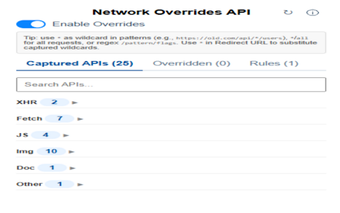
Network Overrides API (DevTools), developed by Van Nguyen (vannt-dev), is a Chrome extension for frontend debugging and QA. It lets developers simulate backend behaviour by modifying network responses inside the browser so UIs can be tested without changing server code. The tool presents an in‑browser interface for response editing and targeted match rules. Frontend engineers and testers gain a quick way to prototype, reproduce errors, and validate UI handling when backend services are unreliable.
How does it fit into a developer's edit‑reload‑test workflow?
The extension embeds a dedicated panel inside Chrome DevTools so changes apply immediately to pages under inspection, removing the need for external proxy setup. Key developer conveniences include on‑the‑fly response editing and local redirection to files, which shorten the loop between making a UI change and verifying behavior. Use cases include rapid prototyping, reproducing backend regressions, and testing UI reactions to specific payloads.
How light is its runtime impact on the browser?
The project advertises a lightweight design that does not significantly affect browser performance, which makes it suitable for day‑to‑day debugging on desktop. Because it runs inside Chromium's DevTools, it avoids system‑wide proxy configuration and sits alongside normal tab processes. That placement limits its surface area for resource usage compared with separate proxy applications that capture all system traffic.
What privacy and transparency considerations apply?
The developer states the extension processes interceptions locally and does not collect or share personal user data; the codebase is maintained as an open‑source project on GitHub. Practical implication, teams can inspect or fork the source, and local processing reduces the need to install root certificates or change system proxy settings often required by external sniffing tools.
How flexible are the mocking and matching options?
The extension supports targeted overrides such as editing response bodies in real time, redirecting requests to different environments or local files, and simulating HTTP status codes like 404 or 500. It accepts URL pattern matching and Regular Expressions for precise selection. These capabilities let testers craft edge cases and exercise frontend error handling without modifying server endpoints.
A practical, developer‑centric tool with a focused audience
Given its DevTools integration and GitHub maintenance, Network Overrides is a practical option for frontend engineers and QA who need fast, inspectable network mocking. The trade‑off is its narrow scope: it addresses browser‑level testing inside Chromium and is not intended as a full system proxy. Teams that require in‑browser, auditable mocking benefit most from the extension's focused design.